A few years ago I wrote about my toughest day as a teacher. The first day of school. The first day of my daughter going to Kindergarten. The original post is here.
September 5th 2017 was the second toughest day. My son started Kindergarten. Big day for him. Big day for my daughter too, she started 2nd grade. We have moved out of Brooklyn to be closer to where I teach. One of the biggest benefits is my kids can attend school in the district where I teach. It's an awesome district and I am grateful for the opportunity for my kids to experience it.
It means my son starts Kindergarten and my daughter starts 2nd grade. New house, new town, new school. Lots of new things...
Monday, September 18, 2017

Saturday, September 9, 2017
Hello, 2017-2018 school year!
The 2017-2018 school year is underway!
The lab is full of iPads, Chromebooks, MacBooks, and iMacs...

This past Friday, the first Friday of the school year, we were able to get Chromebooks into the hands of every 5th graders. Over the next few days we will be rolling out Chromebooks to the 3rd and 4th, graders too. All 3-5th graders should have their Chromebooks by the end of next week!
This coming week is also the week to do the introductory lessons (Acceptable Use Policy and lab procedures) with K-2. Then it's rolling iPads into the K-1 spaces and getting everyone up and running on those too.
Busy times. My goal is that by Friday September 15th all tech will be deployed and utalized. It'll be fun once I can get classes back in the lab after all the start-up requirements are out of the way...
It's going to be a great year. Feel free to follow my class Twitter account @HeathcoteTech to see our year in tweets.
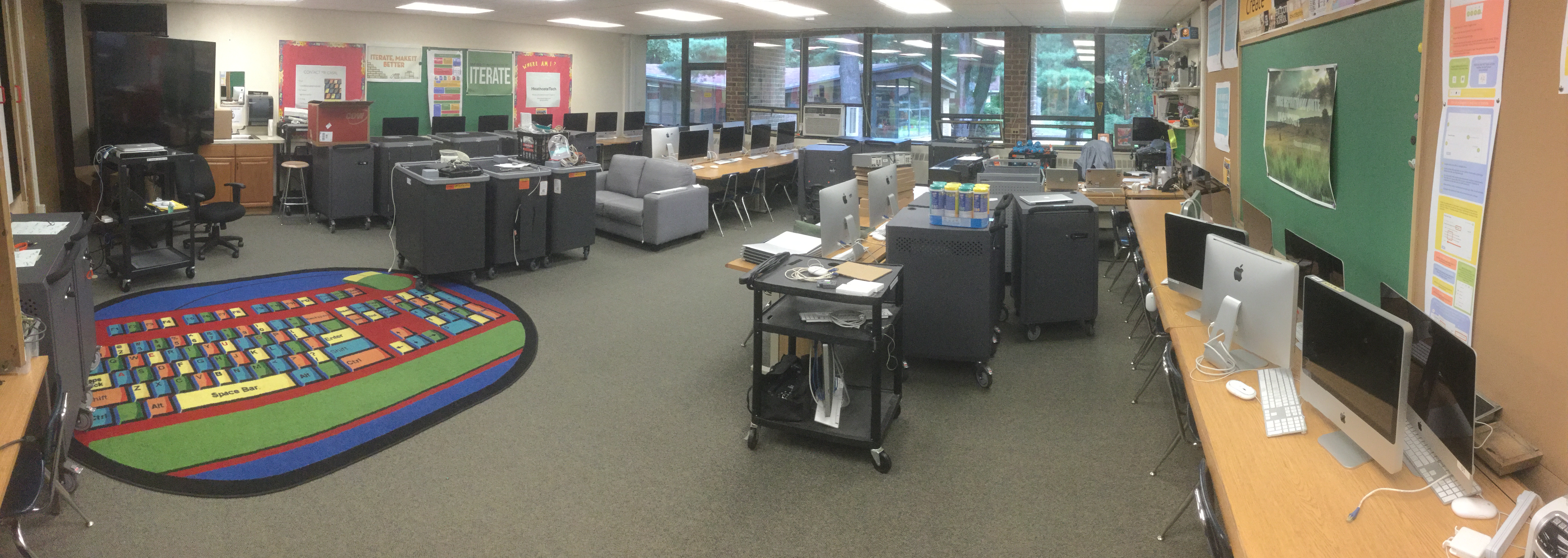
This past Friday, the first Friday of the school year, we were able to get Chromebooks into the hands of every 5th graders. Over the next few days we will be rolling out Chromebooks to the 3rd and 4th, graders too. All 3-5th graders should have their Chromebooks by the end of next week!
This coming week is also the week to do the introductory lessons (Acceptable Use Policy and lab procedures) with K-2. Then it's rolling iPads into the K-1 spaces and getting everyone up and running on those too.
Busy times. My goal is that by Friday September 15th all tech will be deployed and utalized. It'll be fun once I can get classes back in the lab after all the start-up requirements are out of the way...
It's going to be a great year. Feel free to follow my class Twitter account @HeathcoteTech to see our year in tweets.
Monday, July 3, 2017
CapCon! 2017 - a capstone learning conference
Every year the 5th graders of Scarsdale participate in Capstone. Capstone is the last two months of school, post-standardized testing. Students choose a topic, research it, and create a final product. It is designed to be a self-directed, passion/interest based assignment. And it ends with a tri-fold board...
For the second year in a row our school decided to turn it on it's head. We launched CapCon! last year, and this year we did it again...
We began the 2017 CapCon! season the same way we did in 2016, with a "No more tri-folds" blog post and lesson.
Here's how we did it...
For the second year in a row our school decided to turn it on it's head. We launched CapCon! last year, and this year we did it again...
We began the 2017 CapCon! season the same way we did in 2016, with a "No more tri-folds" blog post and lesson.
Here's how we did it...
Tuesday, May 30, 2017
Comic Books with Google Slides
Last year I posted about the 3rd grade Cultural Tour comic books project I did. It was a first attempt and it went well. But as with anything there is always room to improve.
This year I created a tutorial for my students and colleagues to follow to allow them more time to work independently.
The below Slides presentation is the comic book I made for colleagues as part of a professional development series we call ST@C.
There are also links to various examples of student work. Google Slides is an awesome tool, not just for traditional presentations but for pushing the bounds of possibilities.
Hope this helps other teachers and students get started creating comics with Slides...
This year I created a tutorial for my students and colleagues to follow to allow them more time to work independently.
The below Slides presentation is the comic book I made for colleagues as part of a professional development series we call ST@C.
There are also links to various examples of student work. Google Slides is an awesome tool, not just for traditional presentations but for pushing the bounds of possibilities.
Hope this helps other teachers and students get started creating comics with Slides...
Monday, May 29, 2017
Google Drive: Tips and Tricks
This presentation was originally given as part of Scarsdale teacher's yearly professional development requirement in the area of technology. This PD session was part of the Scarsdale Teacher's Collaborative (ST@C).
From the course description:
Spend an hour learning Drive tips and tricks to help make your digital file life more organized and efficient.
http://blogs.scarsdaleschools.org/heathcotetech/stc/drive-tips-and-tricks/
The PD session slide deck:
From the course description:
Spend an hour learning Drive tips and tricks to help make your digital file life more organized and efficient.
http://blogs.scarsdaleschools.org/heathcotetech/stc/drive-tips-and-tricks/
The PD session slide deck:
Monday, May 15, 2017
GMail: Tips and Tricks
This presentation was originally given as part of Scarsdale teacher's yearly professional development requirement in the area of technology. This PD session was part of the Scarsdale Teacher's Collaborative (ST@C).
From the course description:
Spend an hour learning a few GMail tips and tricks to help make your email life more organized and efficient.
http://blogs.scarsdaleschools.org/heathcotetech/stc/gmail-tips-and-tricks/
The PD session slide deck:
From the course description:
Spend an hour learning a few GMail tips and tricks to help make your email life more organized and efficient.
http://blogs.scarsdaleschools.org/heathcotetech/stc/gmail-tips-and-tricks/
The PD session slide deck:
Wednesday, May 3, 2017
In light of this latest GMail phishing scam...
With this new email phishing scam rearing it's ugly head it's always a good time to pause and think about how these things happen and how we can prevent them.
How do they happen? Usually because we are so accustomed to interacting with email from people we know that clicking on a "Open in Docs" button from a colleague doesn't even faze us.
So what happened and what do you do...?
How do they happen? Usually because we are so accustomed to interacting with email from people we know that clicking on a "Open in Docs" button from a colleague doesn't even faze us.
So what happened and what do you do...?
Friday, April 7, 2017
Blogging with 3rd graders: an overview for parents...
This is a repost from my school blog, HeathcoteTech. I worked with the 3rd grade team on blogging with students over the course of the year. This was one of our final activities, presenting the work to parents at an open Parent Coffee...
Thursday, March 2, 2017
Portable sound booths: audio cubes
In an effort to provide students with a better way to record audition (for movie narration, video reflections, screencasts, and so forth) I have experiments with a few ideas.
Let me preface this by saying I have no illusions about the audiophile quality of these experiments, they are by no means perfect. What they are, instead, is a way to lesson the din of a classroom, and improve sound quality, when recording audio. My sound booth solutions will win no acoustic awards but they do a surprisingly good job in a few areas:
- limiting background noise
- providing more depth/richness to the student's voice since it forces them to be closer to the iPad/laptop microphone
- make everyone else in the room more aware of recording happening
- it was surprising to see how quiet the rest of the room got when everyone noticed the cubes being used
Sunday, November 27, 2016
Your Technology Plan Isn't about Technology
Rock, paper, scissors. The game we all know and love. The game we all grew up with. The game that is very much an analogy for educational technology plans.
Rock, paper, scissors isn’t a game. It’s a means to an end. The game isn’t the purpose, the game decides what comes next. No one plays the game to simply play the game, the game is usually played to decide an order for the bigger game; who goes first, who gets the better seat, all those important childhood decisions.
The other key point to the game is here. No one element; the rock, paper or scissors, is greater than all of them. Each is better than one other but none better than all, and most importantly they all need to be part of the game.
Technology Plan: Rock, Paper, Scissors
Subscribe to:
Posts (Atom)