Monday, May 1, 2023

What is your story?

A follow up of sorts to an earlier blog post, Every project is a story. 


This poster hangs on the wall of my lab....

Sunday, March 26, 2023

Because no one hangs a tv that way...

 A pet peeve is the vertical video. Portrait mode video.

Yes, I know why. It's Instagram's fault. They were the first popular app that didn't allow for device rotation, and they were the first to pioneer app-first media creation.

And no Tik Tok is carrying that mantle (although they do now allow for "full screen" on videos that are able to scale widescreen).

As a television & film major in college I always bang the drum of landscape photography and video recording. We use iMovie and WeVideo to create movies. Movies we share on televisions. 

So I made this...
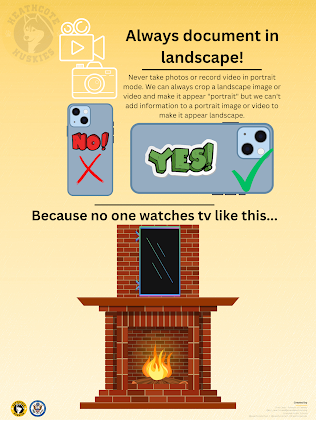

Is this an uphill battle? Maybe. Will I give up fighting for landscape video? Not until we start hanging the tv above the fireplace that way...

Friday, April 29, 2022

Embrace the dumpster fire...

It hasn't always been this way, like most I began my career with trepidation and caution, learning the ropes and gathering experience. Not taking risks, scripting out my day...

Over the last 10 years, at this point the second decade of my career, a lot has changed. I have taken more risks, tried new things, stepped out of my own comfort zone. I have become more comfortable with uncertainty, more accepting of epic failure as a learning win. And I have tried to instill this in my students and colleagues alike.

In the 8 years since I have been at Heathcote School, I have tried to make "embrace the dumpster fire" a school-wide mantra. That we push limits, try new things, and are comfortable with failing.

Sometimes you need to crash int the brick wall at 1,000 miles an hour to best learn, and understand, how to avoid it next time. Learning is messy and rarely in a straight, clean line. The dumpster fire is the epic fail, the epic fail to figure out how to fail less epically next time, to eventually get that win (epic or otherwise). The dumpster fire is knowing it's ok to not be good, or right, or comfortable the first or second or even third time. The dumpster fire is the start of the process.

Failing is key to learning. 

Learning isn't easy, nor clean, nor instant... sometimes the best way to learn how to do something right is to do it completely wrong the first time. Be bold, take risks, learn from failure.

Embrace the dumpster fire...

I created the below poster to represent the "embrace the dumpster fire" spirit, to use in presentations, at meetings, and so forth... 

I also created an alternate version to print as a poster to hang in my lab...


I began this mindset during my last few years teaching in the New York City Department of Education, taking risks and trying new things, being ok with failure as long as I took something from it. It has fully coalesced during my time at Heathcote School. These last 8 years my colleagues have bought into my crazy and are willing to come along for the ride. The students have also embraced it, they have found it liberating to know their teachers are ok with the epic fail, support the epic fail, as long as it is in pursuit of the goal and we learn and improve from it.

Feel free to print for your lab or classroom, all I ask is you keep the "created by" credit at the bottom and cite me as the source/originator when asked.

Go forth and embrace the dumpster fire!

Cheers!

Wednesday, March 9, 2022

Could vs Should

 Could vs Should. Want vs Need


This poster hangs in my lab as a reminder to always create with purpose and to make every choice a choice that adds value to your work, not distract from it.

Friday, January 29, 2021

Chromebooks – Restart to Update

This post also appeared as a reminder to students on my school blog HeathcoteTech

So often technology can be funky. Things work fine one day, and not so fine the next. And often there is no concrete explanation as to why things go wonky.

This is especially true of Chromebooks, but is easily solvable. It is because of an impending update. Google will send out an update to the device, but wait for the user to install it, however, in the meantime that impending update is the cause of the wonkyness…

You should keep your Chromebook up-to-date, and it’s very easy to do so.

If you see a 1 by the clock, that means there is an update available. Click the clock and then click the “Restart to Update” link.

Google sends out updates regularly, and at random times, so any time you see that 1 by the clock, you are welcome to click the “Restart to Update” button.


Think of it as preventative maintenance. Doing something before things go wrong, to prevent things from going wrong…

Monday, September 14, 2020

A Word about Wifi

This piece originally appeared on my @HeathcoteTech class blog


Mesh.

Mesh is the word. A mesh network is a more reliable, stronger home wifi network, and a key asset in 2020.

What is a mesh network?

A mesh network is multiple wifi access points for your home to ensure fewer dead zones, faster connection, and overall better reliability

You mean like a network extender?

No. An extender takes the signal from your modem and extends it out, but at a downgraded level. Think of a ball of dough, pinch a bit and stretch it out. The further you get away from the original mass, the thinner the dough becomes. Same with a wifi extender, yes it will stretch your network range, but as a progressively thinner level.

So how is a mesh network different?

Mesh networks set aside a channel of communication between the access points, that is only for the access points, so the satellite that is far away from the original modem is broadcasting the same strength signal as the original base. No loss of strength.

Are they hard to set up?

Nope. Just plug it in to your existing Verizon/Comcast/etc modem and it's a few steps and you're good to go. Most systems have an app and 3-5 steps to get going, plus you can manage the devices from the app.

But why? If I have crazy fast FIOS, why do I need this thing?

Because your crazy fast FIOS service is being managed by an average piece of hardware. The wifi routers that come for free with service are mediocre at best when it comes to managing traffic. And the further you get from them, physically, the weaker the signal.

But seriously, I have crazy fast FIOS, why do I need this?

Think of your FIOS connection like a smooth, open road, as far as the eye can see. Fast. Your devices are that race-tuned V8 car hungry to tear down the road. Your router is like the like the on-ramp. Specifically a Brooklyn-Queens Expressway type on-ramp. Sometimes closed, sometimes under construction. Pothole filled and a slog to get through. A mesh system is a smoother, more managed on-ramp. In fact, it's like having multiple on-ramps in a system that gets you on the highway fast and smooth.

A real-world example...

I've had a mesh network for years. I moved into a new apartment 1 week before the March 9th Covid lockdown. The apartment had Verizon FIOS. On the first day of remote learning our router got jammed. Only 1 person could be on a Zoom at a time. I dug my mesh system out of the moving box and plugged it in to the Verizon modem, and instantly all four of us could Zoom, watch Netflix, etc.

Why? Because mesh wifi systems do a much better job at managing the data traffic and balancing the signal

Home WiFi and Mesh WiFi filled house

So, if last Spring you experienced difficulty with Zoom, slow connections, inability to connect, and so forth, it wasn't Google, or the Chromebook, or Zoom. It was most likely the generic wifi router getting jammed with data.

What do I actually know about mesh systems?

I have the Netgear Orbi RBK 50. This summer I installed the Netgear RBK 753 system for an Inn in Maine. The Inn is in the western Maine mountains and only has a DSL connection. After installing the RBK 753 device connections speeds were faster, more people could be on the Inn's wifi without it jamming, and we didn't nee to reboot the router anymore. All we did was plug it in to the DSL modem and configure the Orbi name. That's it. Took us less than 1 hour to set up.

Mesh network options are:

Netgear Orbi

Linksys Velop

Google Nest Wifi

Points of note

First point of note, if you buy one of these, don't unplug your VerizonComcast/etc modem/router. Those power your tv's on-screen channel guide. Just plug the mesh system into your existing hardware, give the mesh system a new name, and then move your devices over to it. It takes about an hour to do it all from opening the box to adding the new network to your devices, but you'll be amazed at the difference.

Second point of note, the apps that you use to set these systems up are free ad awesome. With my Orbi I can see every device connected to my network and I can turn off an individual device's access with a single tap. So when my kids aren't listening to me, and wont get off YouTube, I just launch the app and turn off their wifi access... the subtle joys of parenting in 2020...

Mesh

Mesh. It will change your hybrid, virtual, and e-learning experience. The expense is paid for in far fewer headaches. Not to mention it'll make your streaming services run better too.

Monday, March 30, 2020

Create Editable Worksheets out of PDF Files

This piece originally appeared on my @HeathcoteTech class blog

In this era of e-learning there is the difficulty of students using PDF worksheets. 

In the past we would print those out, Xerox them in bulk, and have the students write directly on them. That isn't possible right now. 

So, lately, the solution has been to give students the PDFs, have them print at home, work on them, then take a picture of the finished sheet, or scan it, and send it back to the teacher... 

... that is laborious and has many spots for failure along the way. 

So, how do we use PDF worksheets in a paperless environment? Make the PDFs into Google Slides files so the students can add annotations like arrow, lines and shapes, as well as type answers directly onto the pages. shapes, text boxes. By doing this you can turn your PDF inso a Slides file, share it with students, and they can fill it out directly in the Slides file which you already have access too! No downloading, no printing, no scanning, no sending back... 

Below are two versions of the same tutorial, one a step-by-step visual, the other is a video screencast of the steps. Take a look and give it a try... 

Step-by-step tutorial


Video screencast of the steps


Please remember that the original PDF files you are working with are most likely copyrighted, so you can not re-create an entire book, can can convert select pages. The 10% rule is good to remember, meaning you can print/share 10% of a total piece of copyrighted material. If the book has 100 pages, you can print/share 10.   

Let me know if you have any problems or questions.   

 Thanks!

Thursday, March 26, 2020

iOS Document Camera

If you have a Mac and you have a iPad or iPhone you have a document camera!

Here is a quick tutorial on how to set it up...


And a 1-page poster with the same steps...


You can also download the Stage app to have some annotation features, but it is not necessary.

Happy document camera-ing!

Friday, November 15, 2019

Fall 2019 Chromebook Buyers Guide

I originally wrote this for my class blog @HeathcoteTech. After receiving multiple emails from parents with personal device/Chromebook questions I figured I'd turn my email replies into a more structured "buyers guide" of sorts. The thoughts and opinions in this post are my own and crafted with 2nd-5th graders in mind, as that is the population I teach. This is in no way meant to be a comprehensive list of the "best" Chromebooks on the market.


This is the second annual Chromebook Buyers Guide. Chromebooks are great devices for elementary school students and beyond. There are lots of options and hopefully this guide will give you a sense of why go Chromebook and which models(s) to check out. Enjoy...

As the years have progressed there has been an ever increasing interest from parents to purchase Chromebooks for home use. Awesome!
I think it's an excellent idea and a great investment, we use them every day at school and I have four in my home.
Before I get into some device specifics I want to touch on a few common points of interest from parents...
By Koman90 [BSD (http://opensource.org/licenses/bsd-license.php), CC BY 2.5  (https://creativecommons.org/licenses/by/2.5) or GPL (http://www.gnu.org/licenses/gpl.html)], from Wikimedia Commons

Saturday, October 26, 2019

Interactive Whiteboard Alternatives

One of the biggest, literally, things in edtech is the interactive whiteboard. Smartboards, Promethean, there are a few manufacturers.

My district uses Smartboards. I'm not a fan. This post isn't a rant on why I don't like them, the purpose of this post is to outline an alternative, but to give some context, here is why I'm not a fan, and never have been, of interactive whiteboards...
  • they are expensive. $3k+ is a lot to spend on a single item
  • they are a central focal point... but classes should be flexible and fluid, a large fixed object like an interactive white board take up a lot of classroom real estate and are only used a small portion of the day
  • most users only use a fraction of capabilities
    • that may be due to lack of training, or that those features are bells and whistles and don't fit seamlessly into a teacher's workflow.. either way it's an issue
  • they only do one thing
    • ok, so not literally one thing, but a large, fixed object, no matter how "flexible" or "versatile" it's still a piece of furniture

So, what's the alternative?

Saturday, October 12, 2019

ACTEM 2019 Reflections

ACTEM is the Association of Computer Technology Educators of Maine. I had the pleasure of attending their fall conference this year and it was a blast.

Maine is doing some great things with technology, with state support and the Maine Learning Technology Initiative (MLTI)...

In 2002, Maine became the first state to provide a personal portable computer device to each 7th and 8th grade student and teacher, along with the software, wireless networks, technical support, and professional development needed to effectively use the technology for teaching and learning.  Read more about the groundbreaking MLTI program on the History page.

The program has changed somewhat over the years, but the goal remains the same:  to provide State support for access to technology-enhanced educational experiences for all students. In the 2018-19 school year, the State will be helping over 300 schools obtain educational technology and the professional learning necessary to take advantages of all that technology offers.
The conference had the usual slate of featured keynotes and breakout sessions. What I found so valuable was for the relative small size of the conference (a few hundred attendees) the quality of the presentations, and skill/knowledge of the presenters, was amazing.

Sunday, September 1, 2019

Student headphones: an overview and some recommendations - 2019-2020 edition

This piece originally appeared on my @HeathcoteTech class blog

At the start of the 2018-2019 school I wrote the first blog post regarding student headphones. This edition is essentially the same, has the same rational and overview with updated links. Headphones for children don't change as frequently as high-end adult models, so this post is almost identical to last year's post, with updated links.

I often get asked about headphones for students. It’s a difficult question to answer on many fronts. Price is one concern, but so is durability. A microphone is an important consideration since students use apps like Seesaw to record their learning. And their age. A kindergartner has different needs than a 5th grader in terms of size, fit, and functionality.

Here is a breakdown of how I approach the K-5 headphone question…

Monday, July 15, 2019

CapCon! 2019 is in the books

Every year the 5th graders of Scarsdale participate in Capstone. Capstone is the last two months of school, post-standardized testing. Students choose a topic, research it, and create a final product. It is designed to be a self-directed, passion/interest based assignment. And it used to end with a tri-fold board... But not since 2016!
This post was originally written for the @HeathcoteTech blog and first appeared at http://blogs.scarsdaleschools.org/heathcotetech/2019/06/27/capcon-2019-is-in-the-books/
Once again the 5th graders were amazing and rocked the CapCon! Capstone event.
The students documented the process on their own blogs. The blogs can be accessed via the classroom teacher’s blogs (look for the “My class” menu on the sidebar).
Check out all of their speeches and movies here:

Thursday, June 27, 2019

Basecamp 2019

June 27th, 2019. The first day of summer vacation. But it was also #Basecamp2019 hosted by Chappaqua Schools!

It was a great way to end the school year and kick off summer; reconnecting with colleagues and friends, meeting new ones, sharing, learning... it was a great finish to the year and a perfect way to start the summer.


One of my favorite moments of the day was the Symposium Session run by Daniel Valentin and Valerie Brunow. They created a NCAA-style bracket challenge around poetry and crowning a "best poem." It was great to look at something like poetry in that way, since poetry isn't something you can easily say is best or worst, especially across different genres and the different ways to experience it (reading it, having it read to you, or watching a video of the poet read the poem as they intended).

It was a great session that got me thinking differently about poetry as well as how I might have some fun with a tech-focused bracket challenge.

In addition to watching a number of sessions, I presented a few things during the conference and this blog posts will serve as the central repository for all the things I rambled on about.

And a big thanks for Ellen Moskowitz for capturing my finest summer shirt during my Adobe Spark roundtable discussion


Adobe Spark blog posts
Poetry with Adobe Spark
Social Studies with Adobe Spark Video


Ignite the Student Presentation: Ditch the TriFold and Ignite Passion and Creativity
This is the 4th year we've done CapCon! with TED and Ignite Talks and every year is a new challenge and a new success, and it was great to share it with the folks at Basecamp mere days away from the event.


Check out all the Ignite and CapCon! blogs posts from previous years to see how we've evolved the process.

Thank you to everyone I connected with, reconnected with, came to my session, sat at the roundtable, or just said hello to. I had a great day!

And of course, big thanks to Chappaqua Schools for hosting!

4th Grade Ignite Talks

In 2018 we tried the Ignite Talks format with a single 4th grade class. This year we did it with the entire grade.


Before we dive into the awesomeness that is the 4th grade Ignites allow me to define Ignite Talks and how we use them…

Ignite Talks originated in Seattle as a new style of presenting. The format is: “5 minutes, 20 slides, auto-advancing every 15 seconds… enlighten us but make it quick.” 

We have modified that format for 4th grades;

“7 slides, 15 seconds per slide, 1:45 to tell us your story.” For the 4th grade we took the social studies unit The American Revolution and centered the Ignite Talks around that idea and area of study.

Last year the Ignites were a reflective presentation on their Colonial America unit of study. This year their Ignites are all about their study of the American Revolution. Their unit of study around the American Revolution was a 6+ weeks history experience. They researched, read novels, created period-inspired political cartoons and diary entries, and looked at the major factors, from both sides, of the start of the American Revolutionary Way. Their Ignite Talks are a summary of their experience. We gave them 7 slides and 1:45 to tell about their learning experience, in their own words. It is the ultimate reflective assignment, they had to look back at the full experience and think about the different assignments and projects and how they connected, or didn’t, with each. These Ignites are their literal final project for this unit, summing up everything they did, learned, experienced, and how they felt about it all. All in one minute and 45 seconds…


Monday, June 24, 2019

Social Studies with Adobe Spark Video

This post was originally written for the @HeathcoteTech blog and first appeared at http://blogs.scarsdaleschools.org/heathcotetech/2019/06/20/social-studies-with-adobe-spark-video/

Adobe Spark is a great platform we've been experimenting with this year. Adobe Spark has a few great benefits including being cloud based so students can use any connected device and access their work anywhere, and it gives you 3 options; Spark Post, Spark Page, and Spark Video. We used Spark Post earlier this year to create poetry graphics.

For the 3rd grade Cultural Universal and 5th grade Immigration units we used Spark Video.
For each grade the students had some basic guidelines
  • No more than 6 words per slide
  • No more than 6 seconds of narration per slide
  • Choose music that fits the tone of your story/narrative
  • Choose a theme and color scheme that fits the tone of your story/narrative
The goal of using Adobe Spark Video was to get students to think differently about their presentation. They are adept at Google Slides and very competent at WeVideo. Adobe Spark falls somewhere in between and posed them challenges to figure out; challenges in what they wanted it to do or be like WeVideo while also showing them the possibilities beyond Google Slides.

For both the 3rd and 5th graders they wrote their narratives first, then turned those into a script, which became the narration and the visuals. There was lots of editing, revising, practicing, fine tuning, and ultimately amazing final projects.

Tuesday, May 21, 2019

Poetry with Adobe Express (formerly Spark Post)

This post was originally written for the @HeathcoteTech blog and first appeared at http://blogs.scarsdaleschools.org/heathcotetech/2019/04/30/poetry-with-adobe-spark-post/

Recently we introduced 3rd, 4th, and 5th graders to the Adobe Express (formerly Spark) platform of creative apps.


  • Adobe Spark Post is used when creating graphics such as flyers, posters, infographics, and so on.
  • Adobe Spark Page is for creating scrolling multimedia web pages.
  • Adobe Spark Video is a visual storytelling platform that adds simple animations, music, and narration to slides of text and images.


For the Art and Poetry Festival some 3rd and 4th grade classes used Adobe Spark Post to create and publish their poetry. Here are their final products…

Thursday, May 16, 2019

Periodic Table of Apps - Scarsdale Elementary Schools Edition

This post was originally written as part of a presentation for the Scarsdle Board of Education. It first appeared at http://blogs.scarsdaleschools.org/heathcotetech/2019/04/02/periodic-table-of-apps/


During the March 25, 2019 Scarsdale Board of Education meeting the updated Technology Plan was presented by the Jerry Crisci, the Scarsdale Schools Director of Instructional Technology and Innovation/Co-Director, The Center for Innovation.

As part of the presentation computer teachers and librarians from all grade levels showcased a sampling of what students are using, making and creating.

For the elementary technology team, we created a Periodic Tale of Apps. Elementary students in Scarsdale do a wide variety of things with technology; storytelling, creating, coding, designing... just too many things to only list one or two. This Periodic Table of Apps was designed to give the members of the board and the community members in attendance a better sense of all the great things happening at the elementary level.


Monday, December 24, 2018

Parent Coffee – Internet Safety 3-5

This post was originally written for the @HeathcoteTech blog and first appeared at http://blogs.scarsdaleschools.org/heathcotetech/2018/12/10/parent-coffee-internet-safety-3-5-3/

How do we keep students safe while still allowing them access to the amazing tools available in 2018 and beyond?
Today I lead a Parent Coffee about Internet (and Technology) Safety geared toward the parents of 3-5th grade students.
Attending in person is not always possible, so to ensure the entire community has access to the conversation I am posting the presentation for all to share and use. In addition, this event was recorded and posted on the district website, the video is at the bottom of this post…
All links in the presentation are clickable and will take you to the related websites:

Tuesday, December 18, 2018

Parent Coffee – Internet Safety K-2

This post was originally written for the @HeathcoteTech blog and first appeared at http://blogs.scarsdaleschools.org/heathcotetech/2018/12/04/parent-coffee-internet-safety-k-2-3/

How do we keep students safe while still allowing them access to the amazing tools available in 2018 and beyond?
On Friday, November 30th, I lead a Parent Coffee about Internet (and Technology) Safetygeared toward the parents of K-2 students.
Attending in person is not always possible, so to ensure the entire community has access to the conversation I am posting the presentation for all to share and use. In addition, this event was recorded and posted on the district website, the video is at the bottom of this post…
All links in the presentation are clickable and will take you to the related websites: